Asset Review
The Asset Review dashboard helps you to identify and manage the assets that are handling CUI in your enclave. It provides a quick overview of the distribution of assets by category, such as servers, workstations, laptops, mobile devices, etc. You can also see the details of each asset, such as its name, IP address, owner, location, CMMC level, and compliance status. This information can help you prioritize your efforts to apply the appropriate CMMC controls to the assets that are most critical and vulnerable. The dashboard also helps you to prepare for internal or external audits by showing you the evidence of compliance for each asset. You can export the dashboard data to a report format for easy documentation and sharing.
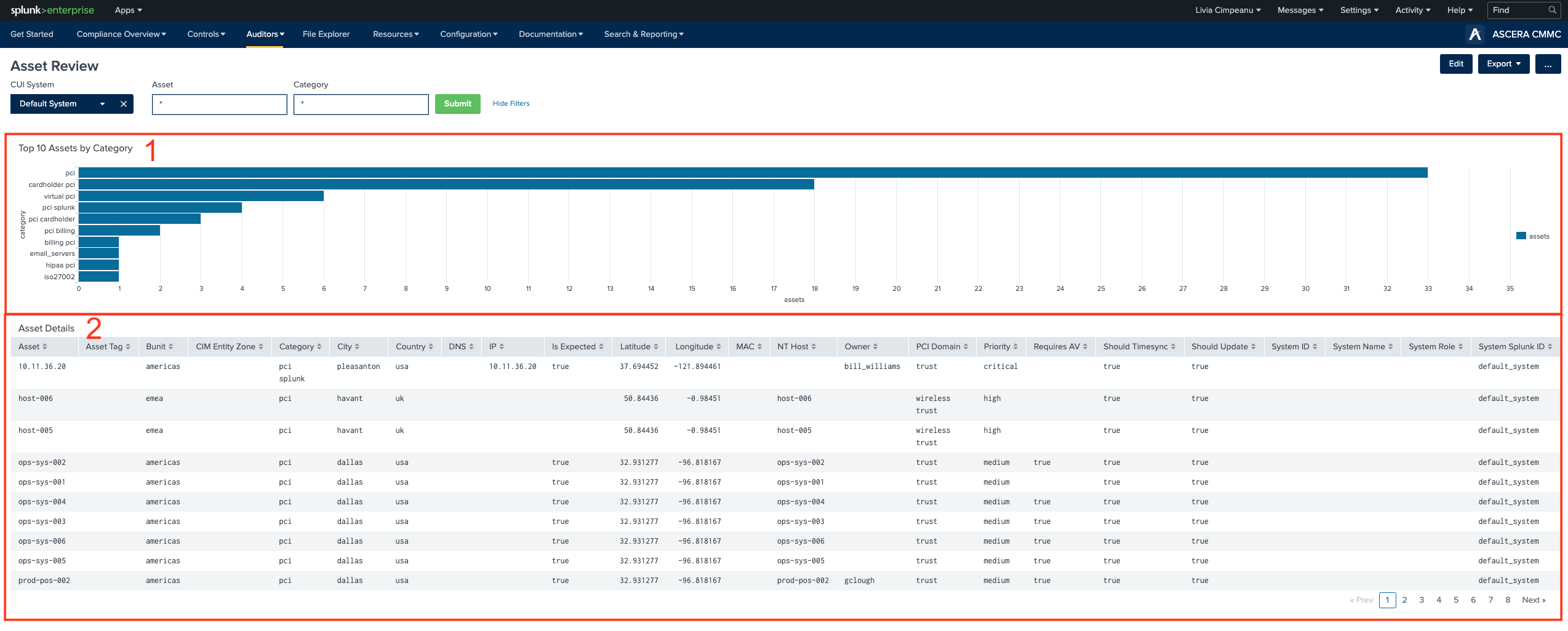
1. Top 10 Assets by Category
The "Top 10 Assets by Category" chart provides a comprehensive view of assets categorized by attributes. It serves as a valuable tool to:
- Categorize Asset Insight: This chart categorizes assets based on their attributes or classification, making it easier for users to assess and prioritize assets based on their importance or compliance requirements.
- Focus on Critical Categories: By highlighting the top assets within specific categories, users can prioritize their attention and resources on assets that are most critical for security, compliance, or operational purposes.
- Efficient Resource Allocation: Understanding which asset categories are most prominent can aid in resource allocation.
- Quick Identification of Key Assets: Users can quickly identify the most important assets within each category, helping them make informed decisions regarding asset management, risk mitigation, and compliance adherence.
2. Asset Details
The "Asset Details" table provides in-depth information about individual assets. Here's why this table is essential:
- Granular Asset Information: Users can access detailed information about each asset, facilitating effective asset management and compliance monitoring.
- Compliance Verification: The table serves as a central location to verify asset compliance status and track any changes in the asset's attributes, which is crucial for ensuring compliance with regulations such as CMMC.
- Resource Allocation: Users can use this table to allocate resources based on asset attributes.
- Efficient Auditing: The table provides a historical record of asset data, making it easier to conduct audits and investigations. Users can trace changes in asset attributes over time.
- Data-Driven Decision-Making: Administrators and asset managers can use this table to make data-driven decisions, such as updating asset locations, assigning asset tags, or reclassifying assets into appropriate categories.
- Export and Reporting: The ability to export asset data from this table is valuable for generating compliance reports and documentation. It simplifies the audit process and provides evidence of adherence to regulatory requirements.