User Review
Premium feature. Click here to learn more.
The User Review dashboard helps you monitor and manage the users accessing your enclave. It shows you the top 10 users by group and by category, based on the number of assets they are handling. You can see the groups and categories you have defined, such as regular users, all users, test accounts, default, privileged, contractor, etc. You can also see the details of each user, such as their name, email, role, group, category, CMMC level, and compliance status. This information can help you ensure that the users have the appropriate access rights and permissions to the assets they handle. This dashboard also allows the users to detect and prevent any unauthorized or suspicious user activity by showing you the compliance status of each user. You can export the dashboard data to a report format for easy documentation and sharing.
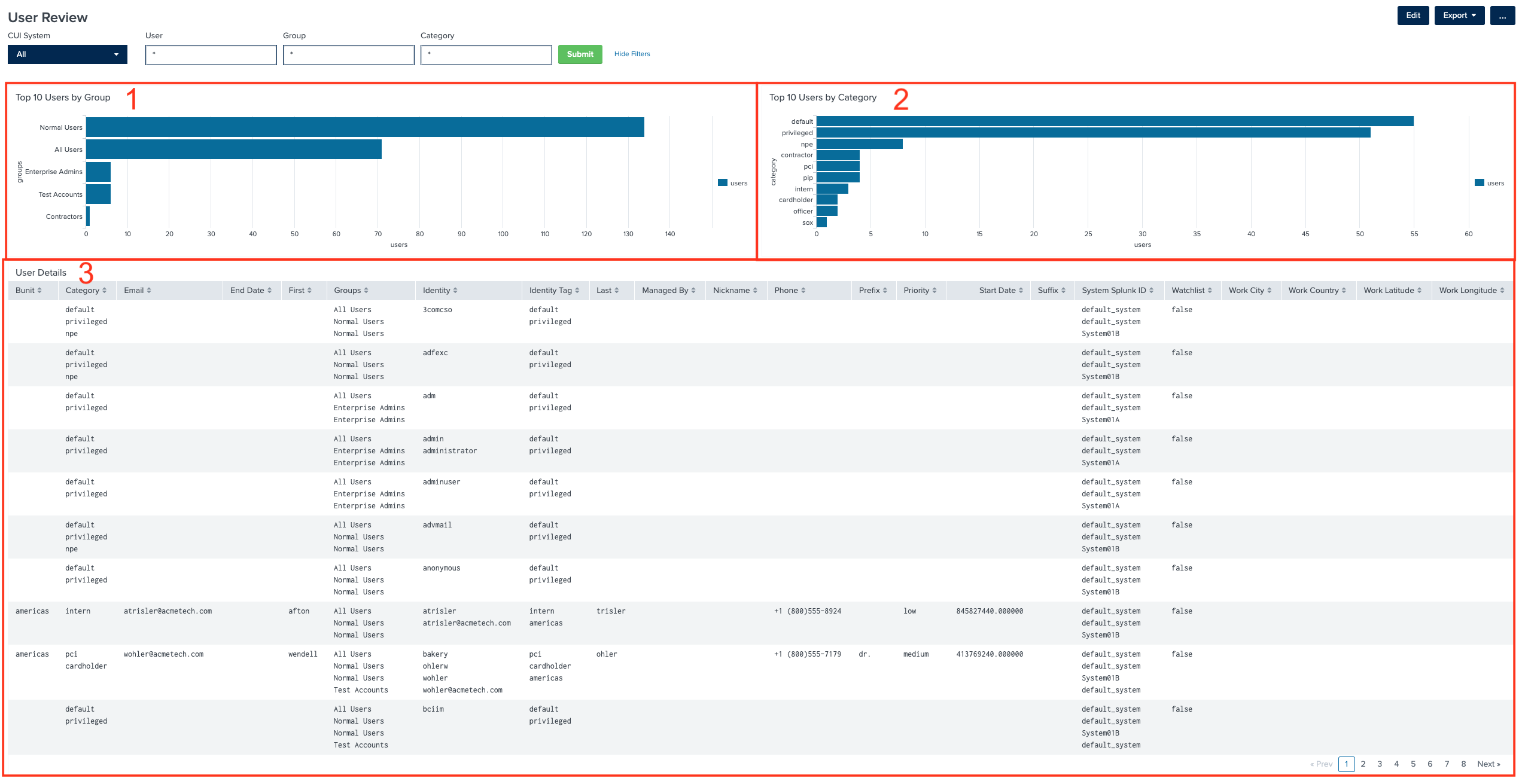
1. Top 10 Users by Group
The Top 10 Users by Group chart provides a clear and concise overview of the most active or influential users within specific user groups in your enclave. It serves as a valuable tool for administrators and security personnel to:
- Identify High-Impact Users: This chart allows you to quickly identify the top users within user groups such as normal users, all users, and test accounts. These users might have a significant impact on system activity and security.
- Focus on Critical Groups: By highlighting the most active user groups, administrators can prioritize their attention and resources on areas that might be critical for security and compliance.
- Spot Anomalies: Sudden spikes or unexpected activity within user groups can be indicative of security incidents or compliance violations. The chart helps in detecting such anomalies promptly.
- Resource Allocation: Understanding which user groups are most active can aid in resource allocation. For instance, if "test accounts" are using a disproportionate amount of resources, it may be necessary to investigate or optimize their usage.
2. Top 10 Users by Category
The Top 10 Users by Category chart provides insights into user activities categorized by attributes like default, privileged, and contractor. It offers the following benefits:
- Role-Based Insights: This chart categorizes user activity based on their roles or categories, making it easier to assess compliance and access patterns for specific user types.
- Privilege Monitoring: It helps in monitoring privileged users who have elevated access rights. Unusual or excessive activity among privileged users can be quickly identified.
- Contractor Oversight: For organizations that work with contractors, this chart helps in keeping track of contractor-related user activities, ensuring that external users adhere to security protocols.
- Custom Insights: If your system allows custom categorization of users, this chart can reflect those custom attributes, giving organizations flexibility in tracking specific user types relevant to their operations.
3. User Details
The User Details table is a comprehensive view of individual user profiles, their access rights, and compliance status. Here's why it's an essential component of the User Review dashboard:
- Individual User Insight: It provides detailed information about each user, including their username, group, category, priority, etc. This granular view is crucial for administrators and auditors.
- Audit Trail: Users' historical activities and access rights changes can be tracked in this table, facilitating compliance audits and investigations into any security incidents.
- Data-Driven Decisions: Administrators can use this table to make data-driven decisions, such as revoking access for non-compliant users or updating user roles and permissions.
- Export and Reporting: The ability to export this data is valuable for generating compliance reports and documentation. It simplifies the audit process and provides evidence of adherence to CMMC requirements.