Review Activity
The purpose of the Review Activity dashboard is to provide a dashboard where all reviews, whether manual or ACE, are available in tabular, chronological order for investigations and monitoring. Several filters are available to narrow search results so that the user can quickly find reviews of interest.
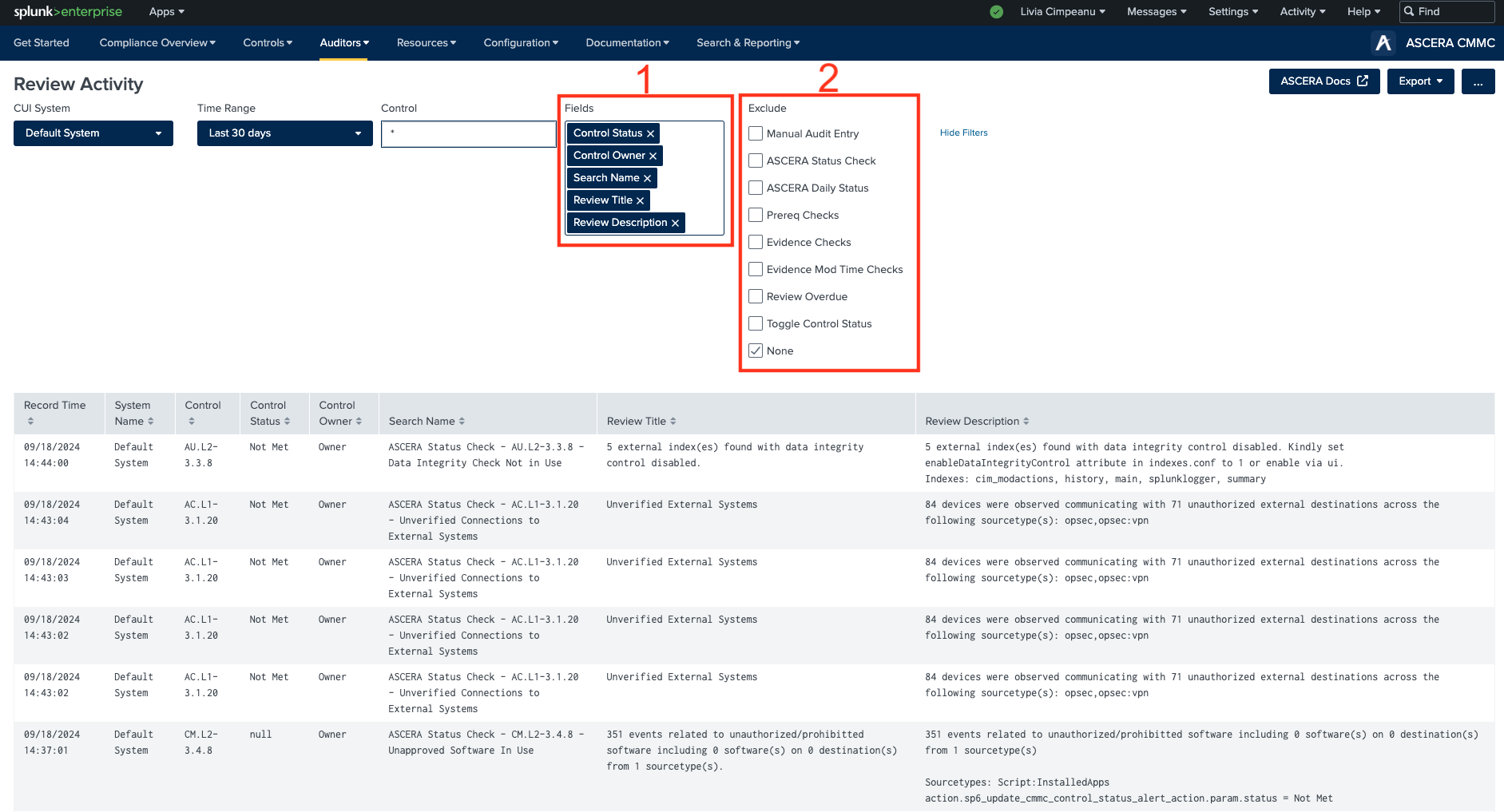
1. Fields filter
- Record Time: The time the record was created.
- System Name: The name of the system the review was created for.
- Control: The name of the control.
- Control Status: The control’s compliance status when the record was created.
- Control Owner: The assigned owner of the control when the record was created.
- Search Name: The name of the search that initiated the review record.
- Review Title: The title of the review record.
- Review Description: The description of the review record; usually includes important information about the review record and why it was created.
- Record Author: The user that initiated the review record; can be a human user or the splunk-system-user.
- Control Reviewer: The user who reviewed the control’s data and determined a review record must be created. In most cases, the Control Reviewer is the same as the Record Author.
- Review Time: The time that a manual review was performed. Presently, there is an error in the table’s search logic that is not displaying data in the column for manual reviews.
2. Exclude filter
- Manual Audit Entry: Selecting this option will exclude manual reviews from the table.
- ASCERA Status Check: Selecting this option will exclude ACE Splunk search results from the table.
- ASCERA Daily Status: Selecting this option will exclude the ASCERA Compliance Automation Daily Status ACE results from the table.
- Prereq Checks: Selecting this option will exclude the ACE prerequisites check results from the table.
- Evidence Checks: Selecting this option will exclude the ACE evidence check results from the table.
- Evidence Mod Time Checks: Selecting this option will exclude the ACE evidence mod time check results from the table.
- Review Overdue: Selecting this option will exclude the ACE review overdue check results from the table.
- Toggle Control Status: Selecting this option will exclude the toggle controls status search results from the table.
The Review Activity dashboard provides a user-friendly interface for efficiently managing and analyzing reviews, helping you to streamline your investigative and monitoring processes.