Manage Automatic Checks
The Manage Automatic Checks page is a simple way of enabling all of the Splunk ACE searches. This eliminates the need to navigate to Splunk-specific pages, streamlining the process. All the Modular Inputs and Saved Searches are together in a convenient place for easy access and management.
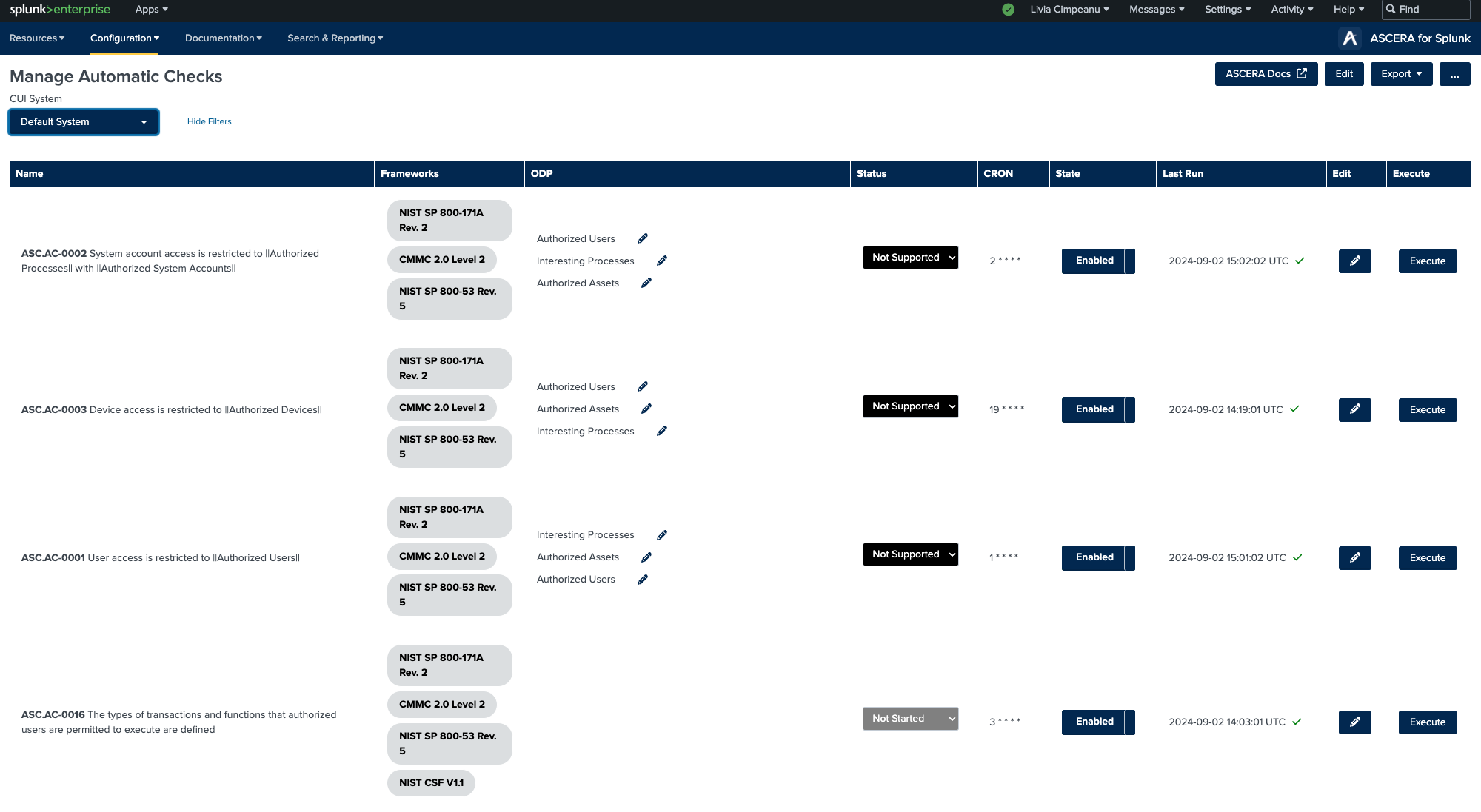
The table on this page offers valuable information for each automatic check, including:
- Name
- Frameworks
- ODP
- Status
- CRON schedule
- State (enabled or disabled)
- Last Run
- Edit
- Execute
The automated checks, primarily the CRON schedule and the state, can be edited.
- To enable or disable an automatic check, simply click on the "State" button for the respective check.
- To edit the CRON schedule and other details, click on the “Edit” button (pencil icon) next to the desired search. his action will redirect you to the Splunk-specific page for that resource.
- To manually execute a saved search, click on the Execute button. This action sends an alert action. Splunk offers the possibility of sending an alert email once a saved search is executed.
In summary, the Manage Automatic Checks page serves as a comprehensive hub for efficiently managing all ACE checks.