Manage Control Owner Details
The Manage Control Owner Details page offers a streamlined approach to managing individuals within your organization responsible for ensuring the effectiveness of controls and mitigating associated risks.
This page displays a comprehensive list of existing control owners and operators, providing users with the capability to manage accounts, delete entries, and add new owners as necessary.
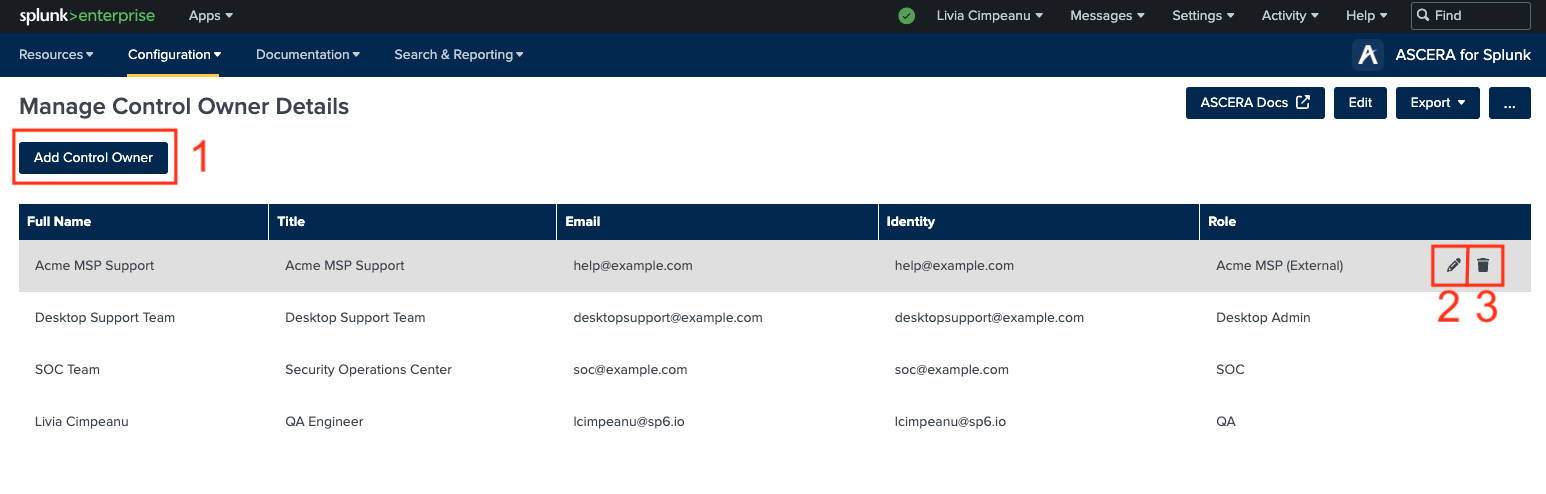
1. Adding a New Control Owner
To add a new control owner, simply click on the designated button to open the form. Fill out the required fields, and the details for the new control owner will seamlessly integrate into the table for easy reference.
2. Editing a Control Owner
Should you need to update the details of any existing control owner, click on the Edit button adjacent to the respective entry. This action opens a form where you can make desired changes. Once complete, the owner's details will be promptly updated.
3. Deleting a Control Owner
To remove a control owner from the list, click on the delete icon associated with the respective entry. A confirmation message will appear, ensuring the accuracy of your action. Upon confirmation, the selected owner's details will be permanently removed. Subsequently, this owner will no longer be available for selection as a responsible party for controls or POA&M (Plan of Action and Milestones) items.