Security Stack Config
The Security Stack Config page serves as a tool for inputting essential data regarding an organization's security technology. This data informs administrators and SP6 Professional Service engineers about the necessary data sources to onboard into Splunk, ensuring the proper functioning of the ASCERA Guardian app. The Security Stack Config page is also used to inform the customer what data is feeding the ACE searches and what the ACE searches are using to determine the compliance status for the controls. This configuration should be completed following the app installation.
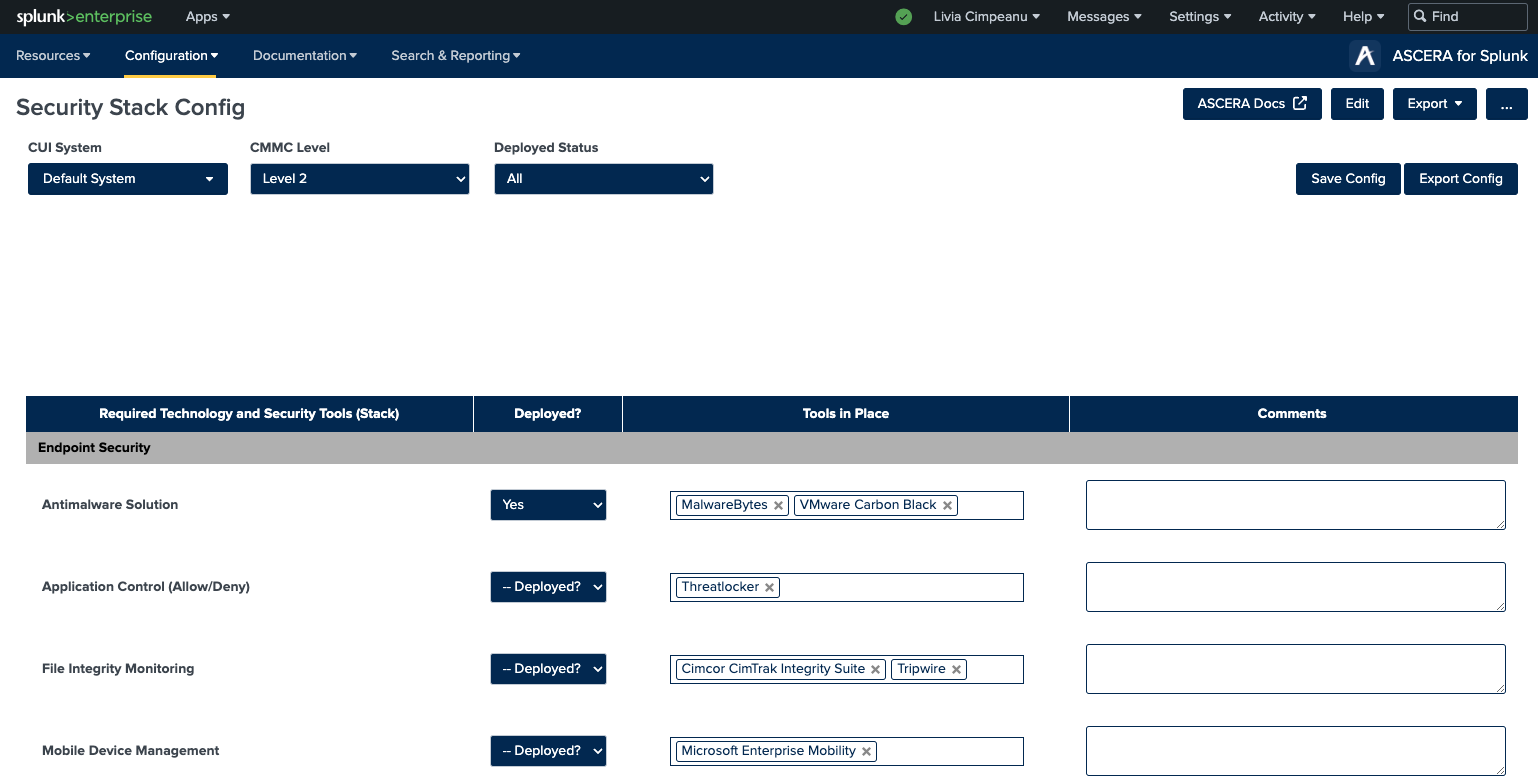
The tools presented in the Security Stack Config page are the tools and technologies recommended by CMMC-COA.
Select CMMC Level
Choosing the appropriate CMMC Level for the organization triggers a dynamic filtering of available technologies and tools, displaying only options relevant to the selected CMMC level.
Required Technology and Security Tools (Stack)
For each category, follow these steps:
-
Deployed?: Select 'Yes' or 'No' to indicate if the technology/tool is deployed.
-
Tools in Place: Choose the currently deployed tool for the category from the dropdown menu.
- If the tool is not listed, select 'Other' and provide the tool's name in the adjacent text field.
- If the 'Deployed?' status is 'No', select 'None' from the dropdown.
-
Comments: Optionally, enter any relevant comments about the category or tool in the provided text field within the category row.
Saving Configurations
It is recommended to save changes frequently. You can do this by either pressing CTRL + S on the keyboard or by clicking the Save Config button located in the top right corner of the dashboard. Additionally, the configuration is automatically saved after any field response is entered.
Exporting Configurations
The security stack config can be exported in a JSON formatted document for review, sharing, troubleshooting, etc. Clicking the Export Config button will automatically download the configuration for the selected system to your device.
Filtering Options
The Security Stack Config page offers filtering capabilities:
- CUI System: You need one security stack config completed for each system. Every system created in your environment requires its own security stack config.
- CMMC Level: Selecting a specific CMMC level will display only the relevant 'Required Technology and Security Tools (Stack)' categories.
- Deployed Status: Choosing a deployed status will filter and display only categories where the 'Deployed?' field matches the selected status.