Lookup Prereqs List
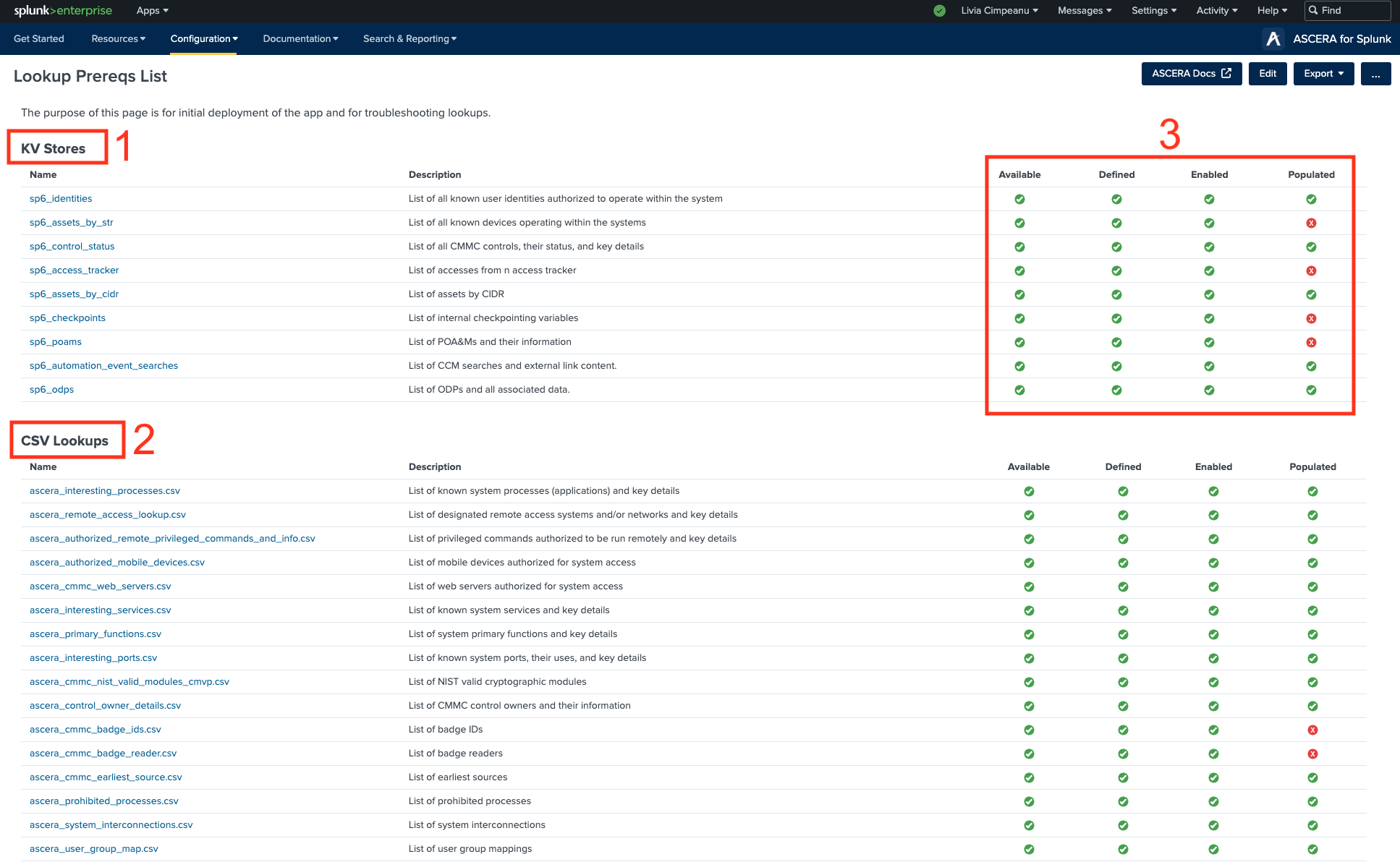
The Lookup Prereqs Master List page serves as a critical component of the app configuration process, providing a comprehensive view of all required lookups necessary for proper functioning.
When navigating on this page, the Lookup Editor should already be installed. If Lookup Editor is installed, clicking on the name of a lookup will automatically launch Lookup Editor with the selected lookup ready for modification. In case Lookup Editor is not installed, a message will be displayed, indicating the need to install it. For installation visit https://splunkbase.splunk.com/app/1724.
-
The KV Stores table includes the following headers:
- Name: Displays the name of the KV Store, and each value from the "Name" column has an attribute leading to a specific page.
- Description: Provides a brief description of the KV Store.
- Available: Indicates if the KV Store is available, using a green checkmark or red 'X' icon.
- Defined: Shows whether the KV Store is defined or not, using a green checkmark or red 'X' icon.
- Enabled: Displays the enablement status of the KV Store, using a green checkmark or red 'X' icon.
- Populated: Indicates if the KV Store is populated with data, using a green checkmark or red 'X' icon.
-
The CSV lookups table includes the following headers:
- Name: Displays the name of the KV Store, and each value from the "Name" column has an attribute leading to a specific page.
- Description: Provides a brief description of the KV Store.
- Available: Indicates if the KV Store is available, using a green checkmark or red 'X' icon.
- Defined: Shows whether the KV Store is defined or not, using a green checkmark or red 'X' icon.
- Enabled: Displays the enablement status of the KV Store, using a green checkmark or red 'X' icon.
- Populated: Indicates if the KV Store is populated with data, using a green checkmark or red 'X' icon.
-
The results of these queries are presented within the respective lookup's table row.
- Green Checkmark Icon: The presence of a green checkmark icon signifies that the query's result meets the prerequisite's criteria, indicating that the lookup is in satisfactory condition.
- Red 'X' Icon: The red 'X' icon indicates an unsatisfactory result for the query. If a lookup's Populated field contains a red 'X' icon, it signals that the lookup requires attention and must be populated with data to fulfill the prerequisite.